
Course on Internet of Things
Exercises Session 1:
Introductory remarks:
The scripts we are going to develop during this exercise session do not depend on any system issues: We do not use command line arguments not available in MicroPython nor do we use any hardware specific features which are not available on a PC. The exercises can therefore be developed and run on the ESP32 but also on any standard PC with Python3 installed.Exercise 1: Use of REPL
Connect to your ESP32 with minicom or thonny. You may try the same thing running Python3 on your PC. Using REPL:-
print \x93Hello World!\x94
-
read in a text using input() and print it
-
Calculate

-
Calculate sin(30\xB0)
If you see errors, how do you correct them? Are the results correct? - Finally make the "print Hello World!" command a script and execute it.
Exercise 2: A simple calculator
Write a script that assigns the values 5 and 3 to the variables a and b respectively Print the results of 4 basic arithmetic operations:-
a+b
-
a-b
-
a*b
-
a/b
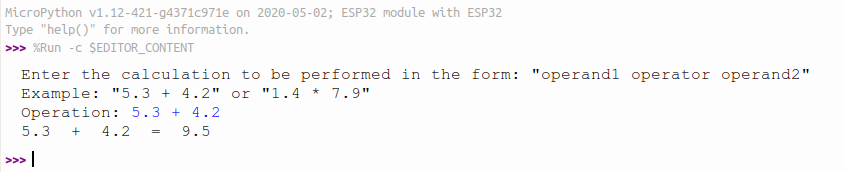 If this happens:
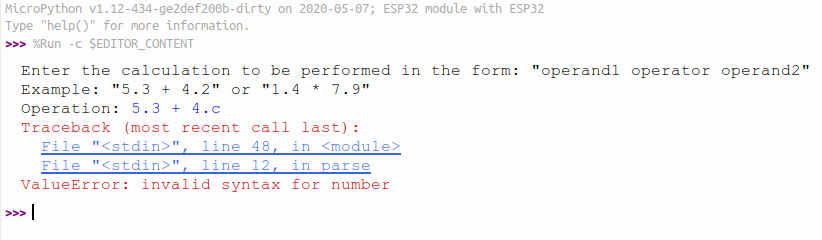 when the user mistypes and enters something that is not a real number, can you capture the error and simply ask the user to repeat his input, until you get 2 correct floating point numbers?
https://iotworkshop.africa/pub/IoT_Course_English/REPLAndStandardPythonProgramming/calculatorV2.py.txt
Bonus points: Writing a parser for user input is rather easy if the numbers and operator are separated by spaces (have a look at the split method of strings). It is quite a bit more tricky if you allow entering calculations without spaces between the operands and the operator. Can you write a parser accomplishing this?
Hint: A very elegant solution to this is the use of regular expressions and Python provides a module helping you with this:
https://docs.micropython.org/en/latest/library/ure.html
A float is defined as follows:
-
zero or more spaces
- followed by one '+' or one '-'
- followed by
- a \x91.\x92 followed by at least one digit
- or
- at least one digit followed by zero or one \x91.\x92 followed by zero or more digits
-
followed be zero of more spaces
| Input | ok or not ok |
|---|---|
| 5.3+4.7 | ok |
| 5.3++4.7 | not ok |
| 5..3 + 4.7 | not ok |
| .3+.7 | ok |
| 5.3+4b7 | not ok |
| empty string | not ok |
| 5.3+. | not ok |
| 5.3+ | not ok |
| -1--1 | ok |
| --1--1 | not ok |
Exercise 3: Conditions
Like in exercise2, start with 2 numbers a,b with values 5 and 7. In your program check which of the 2 numbers is bigger and print the result. Then improve the program asking the user for 2 integer numbers. Make sure he enters 2 correct numbers and capture possible errors. This is a typical output: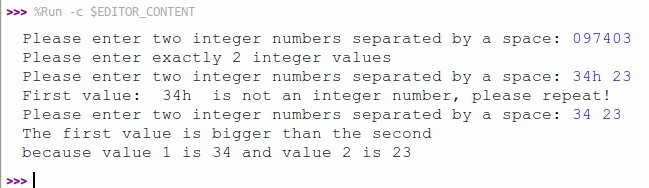
Exercise 4: The Fibonacci series
The Fibonacci number series is defined as: F(0) = 0; F(1) = 1 F(n) = F(n-1) + F(n-2)- Calculate and print out the Fibonacci numbers up to F(n). Get n from the user where n >= 0
- Ask the user up to which is the maximum number up to which you should calculate.
Exercise 5: A bit of Mathematics: Calculate the sine function
Write a script that asks the user for an angle in degrees. Calculate the sine of this angle.Exercise 6: Classes
Write a Python class with methods calculating mathematical number series. These series should be calculated:- The Fibonacci numbers up to F(n). n is passed as parameter to the method
- The Fibonacci numbers smaller than max. max is passed as parameter to the method
- The prime numbers up to max
- Factorial:

- The geometric number series:
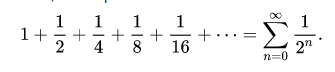
- The harmonic number series:

Can you tell what the following series calculate?
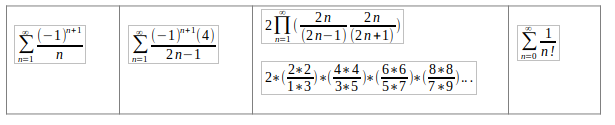 Add these series to your class and try. Write a test script exercising the different methods.
Please also have a look at the Wikipedia page on number series: https://en.wikipedia.org/wiki/Series_(mathematics)
In order to make this exercise run on the ESP32 you must first upload your mathSeries.py module implementing the MathSeries class into the file system of the ESP32. Create a directory called lib on the ESP32 file system and put your module there:
ampy mkdir /lib
ampy put mathSeries.py /lib/mathSeries.py
Once this is done, go to the REPL window of thonny and
import mathSeries
You can now create an instance of the MathSeries class:
series = mathSeries.MathSeries()
When running on a PC you may want to plot the series as well. If you don't know how to plot data in Python, you will find all the information needed here:
https://matplotlib.org/3.2.1/index.html Here is the exercise sheet in odt format: https://iotworkshop.africa/pub/IoT_Course_English/REPLAndStandardPythonProgramming/exercise_1.odt -- %USERSIG{UliRaich - 2020-05-03}%
Comments


| I | Attachment | Action | Size | Date |
Who | Comment |
|---|---|---|---|---|---|---|
 png |
conversionError.png | manage | 19 K | 03 May 2020 - 19:42 | UnknownUser | |
| png |
calcOk.png | manage | 21 K | 03 May 2020 - 19:52 | UnknownUser | |
| png |
conditions.png | manage | 28 K | 03 May 2020 - 20:25 | UnknownUser | |
| png |
factorial.png | manage | 2 K | 04 May 2020 - 12:48 | UnknownUser | |
| png |
geometric.png | manage | 3 K | 04 May 2020 - 12:48 | UnknownUser | |
| png |
ln2.png | manage | 1 K | 04 May 2020 - 12:48 | UnknownUser | |
| png |
pi.png | manage | 2 K | 04 May 2020 - 12:48 | UnknownUser | |
| png |
harmonic.png | manage | 1 K | 04 May 2020 - 12:53 | UnknownUser | |
| png |
wallis.png | manage | 6 K | 05 May 2020 - 14:31 | UnknownUser | |
| png |
wallis1.png | manage | 14 K | 05 May 2020 - 14:35 | UnknownUser | |
| png |
invalidFloat.png | manage | 31 K | 08 May 2020 - 13:38 | UnknownUser | |
 txt |
calculatorV1.py.txt | manage | 438 bytes | 28 May 2020 - 09:34 | UnknownUser | |
| txt |
calculatorV2.py.txt | manage | 1 K | 28 May 2020 - 09:34 | UnknownUser | |
| txt |
calculatorV3.py.txt | manage | 3 K | 28 May 2020 - 09:34 | UnknownUser | |
| png |
wallis_prod.png | manage | 4 K | 27 Jan 2022 - 09:46 | UnknownUser | |
| png |
e.png | manage | 1 K | 08 Feb 2022 - 16:45 | UnknownUser | |
| png |
euler.png | manage | 1 K | 08 Feb 2022 - 16:50 | UnknownUser | |
| png |
mathSeries.png | manage | 9 K | 08 Feb 2022 - 17:36 | UnknownUser | |
 odt |
exercise_1.odt | manage | 126 K | 08 Feb 2022 - 17:45 | UnknownUser |
















Topic revision: r17 - 08 Feb 2022, UliRaich