
Solutions to Exercise 9: Real Time Clock and Data Logging
Exercise 1:
Since connecting to the Internet through WiFi is a very common task, we develop a module doing only this. The module can be put into the /lib directory on the ESP32 (or even better: frozen into the binary of MicroPython) making it available also for later exercises. Here is a program connecting to the Internet through WiFi. You will have to modify it in order to adapt it to your WiFi SSID and password. https://iotworkshop.africa/pub/IoT_Course_English/SolutionsToRealTimeClockAndDataLogging/wifi_connect_UCC.py.txt ... and this is how to access it and what it will print as answers: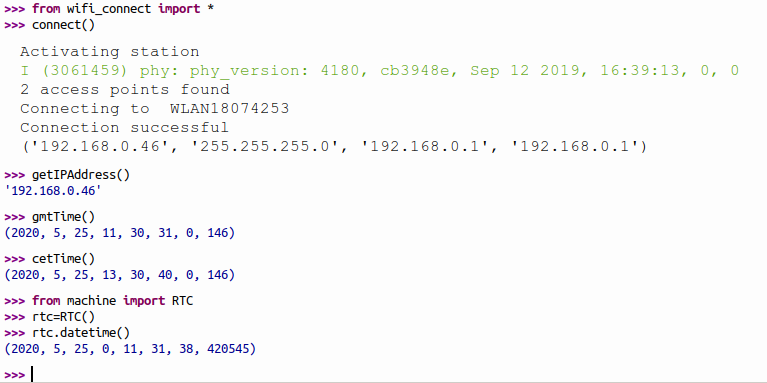
Exercise 2:
Sometimes you may not have access to WiFi but you want to set the time nevertheless. Then the solution to exercise 2 comes in handy: https://iotworkshop.africa/pub/IoT_Course_English/SolutionsToRealTimeClockAndDataLogging/esp32RTC.py.txt The exercise sheet already shows how to use the programExercise 5: Write "Hello World!" file to the SD card
In the solution I mount the SD card (skipping the OSError EPERM emitted if the card is already mounted). I then check with uos.stat if the data directory already exists and I create it if not. Then I open the hello.txt file for writing and I write "Hello World!" onto the file. I finish writing by closing the file. In order to be sure everything went ok I re-open the file, this time for reading. I read the content and print it before closing the file again. I can the connect to the Internet through WiFi and start the ftp server. This allows me to transfer the hello.txt file to the PC and print it there.

 Here is the script:
https://iotworkshop.africa/pub/IoT_Course_English/SolutionsToRealTimeClockAndDataLogging/mountSD.py.txt
Exercise 6: Data acquisition and logging with time stamp
This exercise is quite similar to the previous one with the exception that we write real data now. You have already seen how to read out the SHT30 using the SHT3X driver and you can easily get at the time stamp with now = time.time() if you have set up the correct time with ntptime before. In this case I open the file for writing in append mode and I close it again after having written a new data sample. I recuperate the data through ftp on the PC side:
 Finally I convert the time to a humanly readable form and I compare it to the time seen in MicroPython:
 And here is the script:
https://iotworkshop.africa/pub/IoT_Course_English/SolutionsToRealTimeClockAndDataLogging/sht30Readout.py.txt
-- %USERSIG{UliRaich - 2020-05-06}%
Comments


| I | Attachment | Action | Size | Date | Who | Comment |
|---|---|---|---|---|---|---|
 png |
cpythonTime.png | manage | 30 K | 27 May 2020 - 10:23 | UnknownUser | |
 txt |
dayOfWeek.py.txt | manage | 1 K | 25 May 2020 - 10:29 | UnknownUser | |
| txt |
esp32RTC.py.txt | manage | 4 K | 25 May 2020 - 10:29 | UnknownUser | |
| png |
ftp.png | manage | 73 K | 27 May 2020 - 09:46 | UnknownUser | |
| png |
ftpHello.png | manage | 80 K | 27 May 2020 - 09:56 | UnknownUser | |
| png |
ftpSHT30Data.png | manage | 136 K | 27 May 2020 - 10:19 | UnknownUser | |
| png |
micropythonTime.png | manage | 6 K | 27 May 2020 - 09:46 | UnknownUser | |
| txt |
mountSD.py.txt | manage | 1 K | 27 May 2020 - 09:44 | UnknownUser | |
| png |
sdcardHello.png | manage | 18 K | 27 May 2020 - 09:59 | UnknownUser | |
| png |
sht30Readout.png | manage | 109 K | 27 May 2020 - 10:19 | UnknownUser | |
| txt |
sht30Readout.py.txt | manage | 2 K | 27 May 2020 - 09:44 | UnknownUser | |
| png |
uftpd.png | manage | 6 K | 27 May 2020 - 09:56 | UnknownUser | |
| txt |
wifi_connect_UCC.py.txt | manage | 2 K | 25 May 2020 - 10:29 | UnknownUser | |
| png |
wifi_connect_print.png | manage | 42 K | 25 May 2020 - 11:33 | UnknownUser |




Topic revision: r3 - 27 May 2020, UliRaich