
Solutions to exercise 5: Accessing the real world
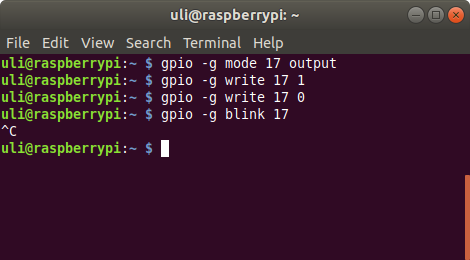
Exercise 5.2: The gpio command
The gpio command has many options of which- mode
- write
- blink
Exercise 5.3 The bash script
In the bash script be must essentially write the same gpio commands as given on the command line in exercise 5.2. We have to add a loop though. I save the script into a file named blink.sh You can run the shell script with the command: sh blink.sh. Even nicer: You can change its permissions to make it executable and run it directly: chmod +x blink.sh./blink.sh
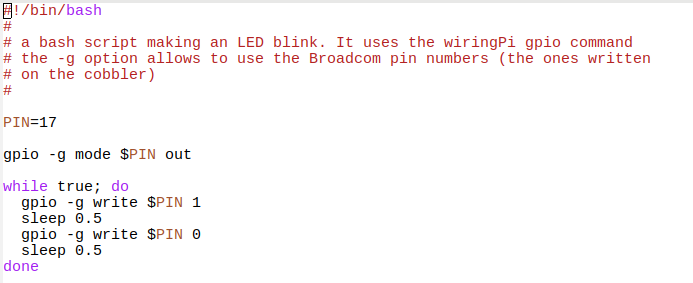 You can find the shell script here:
https://iotworkshop.africa/pub/Embedded_Systems/Exercise5Solutions/blink.sh
Exercise 5.4: A C program making the LED blink
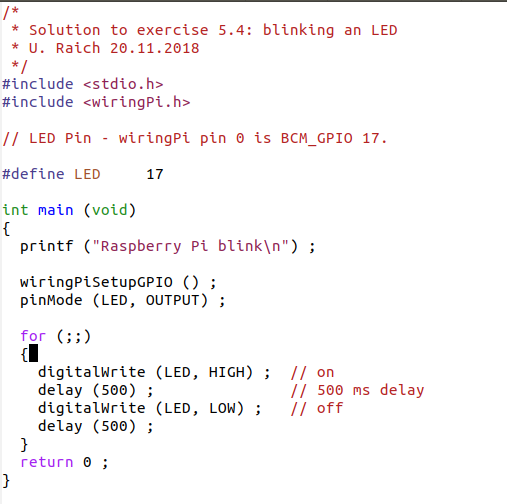
In the C program we will have to:- include the stdio.h and wiringPi.h include files
- initialize the wiringPi library with wiringPiSetup (I use wiringPiSetupGpio, which allows me to use the Broadcom pin numbers)
- set the pin mode to output
- write the logic level to the pin switching the LED on and off
- wait for some time between switching the logic levels
Exercise 5.5: Graceful exit
In order to capture the "^C" which normally just terminates the program we must- include stdlib.h (here the exit function is defined) and signal.h (here all system signals including SIGINT, which corresponds to "^C" are defined)
- create a function which is called when "^C" is seen
- tell the system to call this function when "^C" is seen
 And here is the definition of the new function which provides the graceful exit. We just switch off the LED before exiting the program.
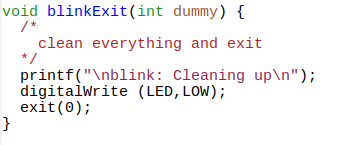 And here is the full program:
https://iotworkshop.africa/pub/Embedded_Systems/Exercise5Solutions/blink2.c
I was asked by a student if it was also possible to gracefully exit the shell script, which I did not know myself. Some research showed that it is possible. This code shows how:
https://iotworkshop.africa/pub/Embedded_Systems/Exercise5Solutions/blink1.sh
Exercise 5.6: SOS
In the SOS program we use a function to implement a single light pulse. This function take a parameter which defines how long the LED will be switched on and how long it will be off afterwards.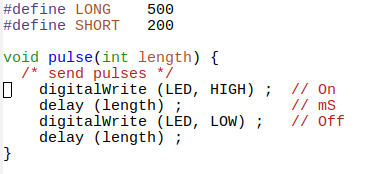 This function is then called in the main program. Here is the full code and its Makefile. The Makefiles for the blink programs are very similar.
https://iotworkshop.africa/pub/Embedded_Systems/Exercise5Solutions/sos.c
https://iotworkshop.africa/pub/Embedded_Systems/Exercise5Solutions/Makefile
Exercise 5.7: The traffic light simulator
The solution to this exercise shows how a program can be driven by data. We build a table in which we define states describing which traffic light is switched on (green an/or yellow and/or red) and for how long this state is going to last. Then the program goes through this tables and switches the lights as defined by the current entry. This is the implementation of a simple state machine. The sequence is as follows:| duration | Traffic light 1 | Traffic light 2 |
| long | red | green |
| short | red | yellow |
| short | red | red |
| long | green | red |
| short | yellow | red |
| short | red | red |
| duration | red 1 | yellow 1 | green 1 | red 2 | yellow 2 | green 2 | hex table entry |
| 1 | 1 | 0 | 0 | 0 | 0 | 1 | 0x61 |
| 0 | 1 | 0 | 0 | 0 | 1 | 0 | 0x22 |
| 0 | 1 | 0 | 0 | 1 | 0 | 0 | 0x24 |
| 1 | 0 | 0 | 1 | 1 | 0 | 0 | 0x4c |
| 0 | 0 | 1 | 0 | 1 | 0 | 0 | 0x14 |
| 0 | 1 | 0 | 0 | 1 | 0 | 0 | 0x24 |
Comments
← PreviousSolutions to exercise 4: The Raspberry PiOverviewSolutions to the exercisesNext →Solutions to the assignment on Buzzer and RGB LED


| I | Attachment | Action | Size | Date | Who | Comment |
|---|---|---|---|---|---|---|
 EXT |
Makefile | manage | 106 bytes | 20 Nov 2018 - 11:07 | UliRaich | |
 c |
blink.c | manage | 446 bytes | 20 Nov 2018 - 10:12 | UliRaich | |
 png |
blink.c.png | manage | 50 K | 20 Nov 2018 - 10:12 | UliRaich | |
 sh |
blink.sh | manage | 300 bytes | 20 Nov 2018 - 09:55 | UliRaich | |
| png |
blink.sh.png | manage | 28 K | 20 Nov 2018 - 09:54 | UliRaich | |
| sh |
blink1.sh | manage | 657 bytes | 20 Nov 2018 - 16:31 | UliRaich | |
| c |
blink2.c | manage | 823 bytes | 20 Nov 2018 - 10:44 | UliRaich | |
| png |
blinkExit.png | manage | 13 K | 20 Nov 2018 - 10:36 | UliRaich | |
| png |
gpioCmd.png | manage | 20 K | 20 Nov 2018 - 09:35 | UliRaich | |
| png |
signal.png | manage | 8 K | 20 Nov 2018 - 10:36 | UliRaich | |
| c |
sos.c | manage | 638 bytes | 20 Nov 2018 - 11:07 | UliRaich | |
| png |
sos.png | manage | 17 K | 20 Nov 2018 - 11:00 | UliRaich | |
| c |
trafficLight.c | manage | 1 K | 20 Nov 2018 - 12:16 | UliRaich | |
| c |
trafficLightTest.c | manage | 1 K | 20 Nov 2018 - 14:07 | UliRaich |












Topic revision: r4 - 20 Nov 2018, UliRaich