
Solutions to exercise 6: The DHT-11 temperature and humidity sensor
Exercise 6.0 Using the library
This is of course the easiest way to access the DHT11 because all the difficult (and interesting) parts are hidden in the library. Nevertheless I give you an example of how to use the library here. The program reads out the DHT11 and prints the results as a sequence of zeros and ones to standard out. You can of course easily redirect this output to a file for further evaluation. There are different ways to find the shared library on the system. You may extent the LD_LIBRARY_PATH environment variable with the directory in which your shared library is located (see run.sh) or you can put the library into a library that is part of the system library search path. https://iotworkshop.africa/pub/Embedded_Systems/Exercise6Solutions/dht11Lib.tar.gzExercise 6.2: Data taking
You may have a look into the implementation of the library, which you can find in the tar archive above. The function dht11Measurement does this.Exercise 6.2 Manual Analysis
Here is a screen dump from a gnuplot image showing the DHT11 data: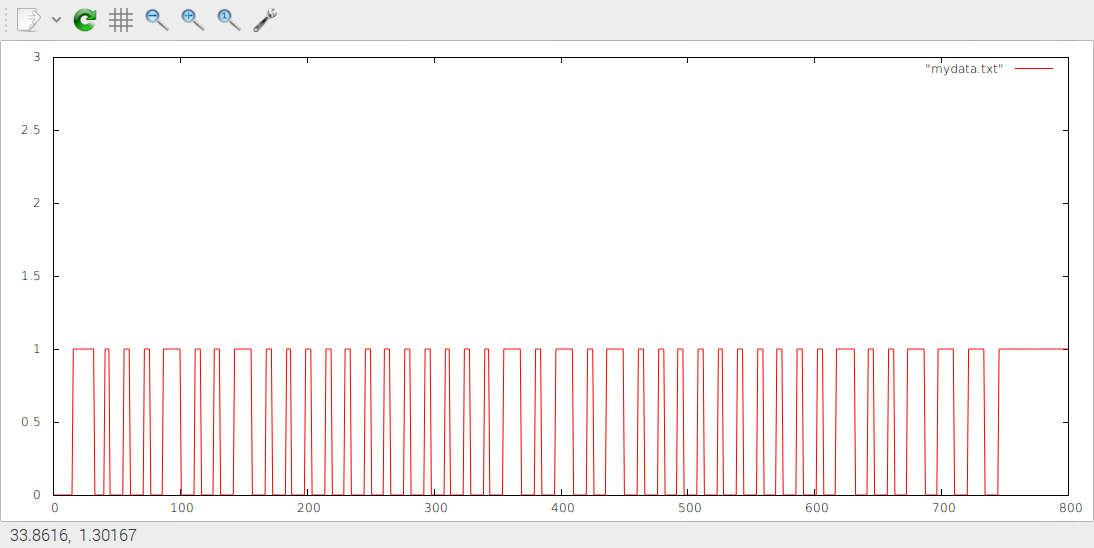 The first long pulse is still due to the start sequence. Then the data are:
0001 0010 = 0x12 = 18 humidity
0000 0000 0001 0101 = 0x15 = 21 temperature
0000 0000 0010 0111 = 0x27 = 0x12 + 0x15 checksum This clearly shows that the measurement has not been made in Ghana!
Exercise 6.3: Analysis done by program
This is actually quite tricky and I am pretty sure you have not come this far during the exercise session. If you want to know how it is done, have a look at the library. The function dht11Evalute does this analysis. It uses a function readBit which take a pointer into the protocol data. It then finds out if the next bit is a zero or a one and advances the pointer to the next bit. Since the pointer is updated we have to pass a pointer to a pointer (int **data) to the routine.Comments
← PreviousSolutions to the assignment on Buzzer and RGB LEDOverviewSolutions to the exercisesNext →Solutions to Exercise 7: Stepping motors


| I | Attachment | Action | Size | Date | Who | Comment |
|---|---|---|---|---|---|---|
 gz |
dht11Lib.tar.gz | manage | 4 K | 20 Nov 2018 - 16:05 | UliRaich | |
 png |
protocol.png | manage | 45 K | 20 Nov 2018 - 15:44 | UliRaich |


Topic revision: r2 - 20 Nov 2018, UliRaich