Accessing the Real World
CSC321: Embedded Systems
First Semester 2018/2019
Slide 1: Accessing Libraries
The Raspberry Pi flat cable connector and the cobbler + bread board, give access to external hardware through| gpio | General-purpose input/ouput |
| I2C bus | Inter-integrated Circuit (I2C) -- I-Squared-C |
| SPI | Serial Peripheral Interface |
| serial port interface |
Slide 2: Software Access
-
External hardware through the BCM-2837 interfaces and their registers directly.
-
This is not for the faint-hearted (read the 200 page manual first!)
-
The easier way to access these devices are ready made libraries giving you a simpler API for access
-
The most popular easier access libraries are;
Slide 3: How to Download and Install Libraries I
-
Both libraries can be downloaded as git source archives.
-
Git download allows you to have the very latest version and to keep your version up to date.
-
Git is a revision control system allowing many developers to work on the same project.
-
You can check out the current version of a software, work on it and upload to the git server the modifications you made.
-
You can also create a new code branch where you implement new functionality which may be specific to what you want to use the code for
-
You may also try to implement new options which may later be discarded or, in case everybody is interested in this new functionality it may be merged back into the main branch.
Slide 4: How to Download and Install Libraries II
-
We download the source code of the library from git to where we want to install it in our file system.
-
To obtain WiringPi using GIT:
-
cd
-
git clone git://git.drogon.net/wiringPi
-
-
To build/install there is a new simplified script:
-
cd ~/wiringPi
-
./build
-
-
we compile with ./build. This is a shell script!
-
In order to keep the library up to date we have to
-
cd ~/wiringPi
-
git pull origin
-
-
This will update the source code to the latest version
-
Here is the installation manual of wiringPi.
Slide 5: The Blinking LED
-
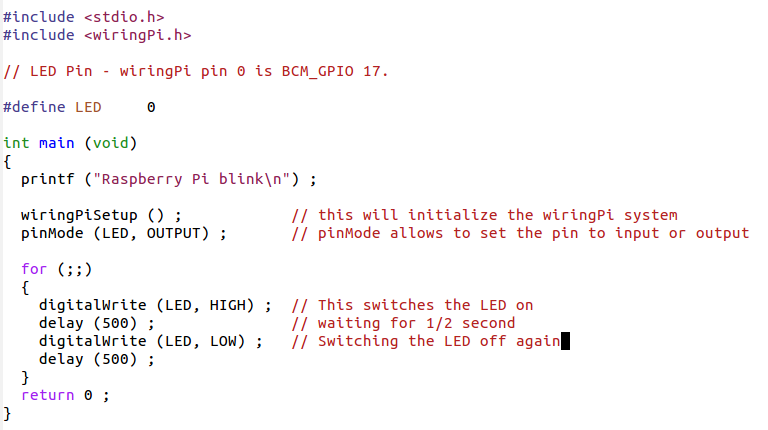
The wiringPi library has included a few example programs to show its use.
-
The most simple one is a program making a LED blink.
-
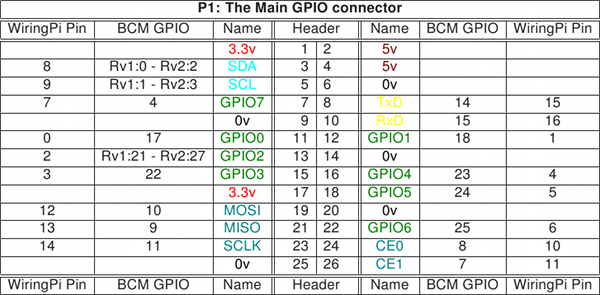
!WiringPi has its own numbering system for the GPIO pins:
Slide 6: Creating blink.c
-
wiringPi has its own include file which must use in order to access the library:
-
#include <wiringPi.h>
-
-
On our systems we have installed this include file is in /usr/include
-
On the Pi file system while the library itself is in /usr/lib
-
As these are the standard positions for include files and libraries on a
-
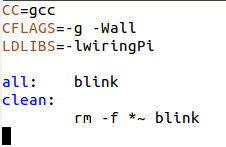
Linux system all we have to do in the Makefile is to add -lwiringPi to the LDLIBS macro.
Slide 7: The C code of blink.c
Slide 8: The Makefile to build blink
Slide 9: The Resistor--Ohm's law
-
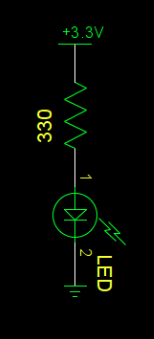
The LED has no resistance and the Raspberry Pidrives the GPIO pins with 3.3V.
-
You must ALWAYS use resistors to connect LEDs up to the GPIO pins of the Raspberry Pi.
-
The Raspberry Pi can only supply a small current (about 60mA).
-
The LEDs will want to draw more, and if allowed to they will burn out the Raspberry Pi.
-
Resistors specifically limit the amount of ‘current’ that flows in a circuit.
-
The measure of resistance is called the Ohm (Ω), and the larger the resistance, the more it limits the current.
-
If we connect LED with circuit diagram shown below, then what is the current flowing through the LED?
Slide 10: WiringPi functions
The library has functions to-
Setup and initialize the library:- This will open the needed device drivers and give access to them.
-
Core functions:
-
sets the mode of a pin to either INPUT, OUTPUT, PWM_OUTPUT or GPIO_CLOCK
-
void pinMode (int pin, int mode)
-
-
read and write from /to pin mode
-
int digitalRead (int pin) ; the value HIGH or LOW (1 or 0) to the given pin
-
void digitalWrite (int pin, int value); It will be HIGH or LOW (1 or 0) depending on the logic level at the pin.
-
-
sets the pull-up or pull-down resistor mode on the given pin, which should be set as an input.
-
void pullUpDnControl (int pin, int pud)
-
-
-
Some Pi specific functions liking getting the version no
-
Timing functions (e.g. delays)
Slide 11: WiringPi functions (2)
-
Priority, interrupts, threads
-
I2C bus functions
-
Serial line functions
-
SPI functions
-
Miscellaneous function
Slide 12: Bash Scripts
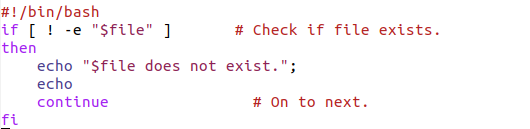
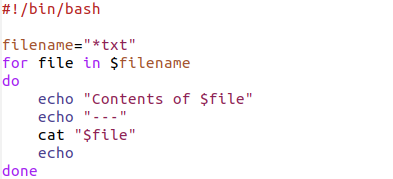
Bash provides it own programming language with-
Assignments
-
a=`ls -l` # Assigns result of 'ls -l' command to 'a'
-
-
Conditional statements
-
Loops
Slide 13: The gpio command
-
There is the gpio command, which is part of wiringPi.
-
It has many options. Please have a look at its man page!
-
One option allows to read and write GPIO pins:
-
gpio write $PIN $ON_OFF
-
If PIN is 0 and ON_OFF is 1 then the LED connected to GPIO pin 0 will go on.
Slide 14: A bit more on C programming
We need to learn a bit more about the libraries we can use Here we will look at-
String handling functions
-
Some bit handling function
-
Exiting a program gracefully
Slide 15: String handling functions
There is a series of functions. Some of the important ones are;-
Compare strings strcmp and strncmp
-
strcmp(string1, string2); #Compare strings
-
strncmp(string1, string2, n); #Compare first n charaters
-
-
Copy strings strcpy and strncpy
-
strcpy(destination, source); #Copy from source to destination
-
strcpy(destination, source, n) ; #Copy n character from source to destination
-
-
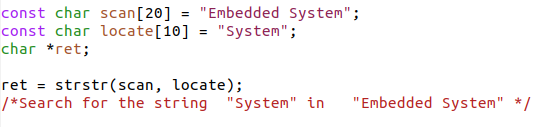
Locate a sub-string strstr
Slide 16: Treating command line arguments
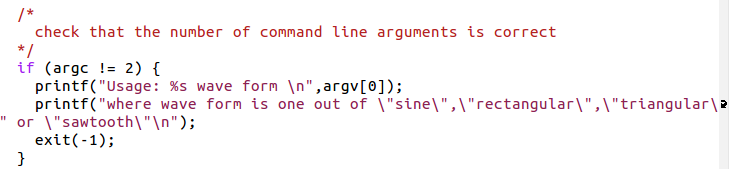
Consider a wave generator where the user can choose the type of waveform using command line arguments. The options are:-
sine
-
rectangular
-
triangular
-
sawtooth
---++
Slide 17: First check it the number of arguments is correct
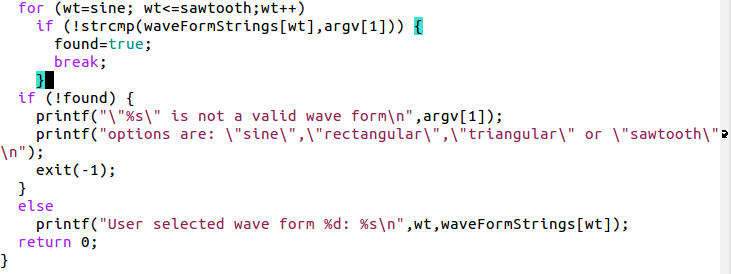
Slide 18: The test and assignment of the wave type
Slide 19: Bit handling functions
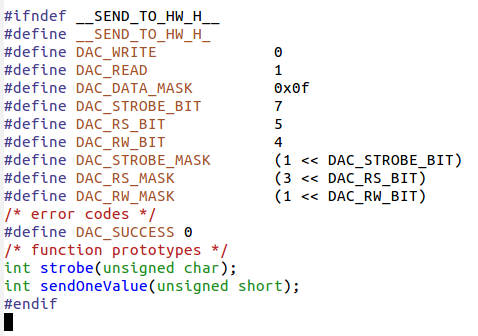
We need to learn a few bit handling functions before being able to prepare the data for the Digital-to-analog converter(DAC):| : bitwise or
& : bitwise and
data += 5 <=> data = data + 5
data |= 5 <=> data = data | 5
~data: invert all bits in data
data >> 4 all bits in data are shifted right by 4
data << 4 all bits in data are shifted left by 4
Slide 20: Writing data to a DAC
Imagine a 12 bit digital to analogue converter with the following register outline: The 12 bit data must be written 4 bits at a time to registers
which are selected by the RS bits.
The lowest significant digit goes to register 0
(both RS bits zero) The medium significant digit to register 1
(RS=01) And the highest significant digit to register 2
(RS=10) To strobe the data into the register the strobe line must see a low to high transition
Slide 21: The DAC
We have a 12 bit DAC, which creates signal levels from 0V to Vcc What is the max. number this DAC can take in decimal and in hex? What is the signal resolution in ‰This is Physics!
Slide 22: Preparing data for the DAC
Remember the bit layout of the DAC register?
We must write the
-
lowest significant,
-
medium significant and
-
highest significant bits
Slide 23: DAC preparation
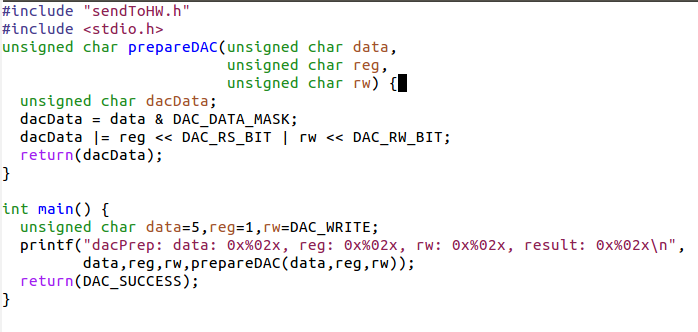
Write a function which prepares a byte for the DAC The function takes 3 arguments:-
The data nibble (4 bits of data)
-
The register selection (0,1,2)
-
The read/write bit
What will be the result if you want to write 5 to register to the middle nibble?
Slide 24: Solution: DAC preparation
Slide 25: Now the test program generating data for the DAC
Slide 26: Strobe
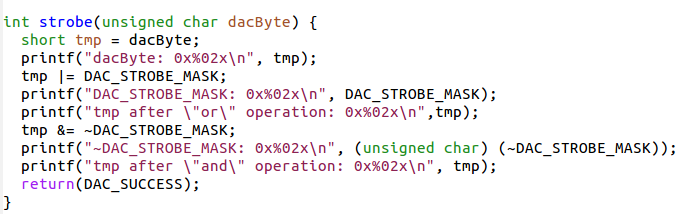
Now create a strobe function which takes DAC data (including the register bits) and generates a strobe signal on the STR line without touching the other bits With a correctly prepared data and register byte this will write the data to the correct register within the DACSlide 27: Solution: Strobe
Slide 28: Exiting a program gracefully
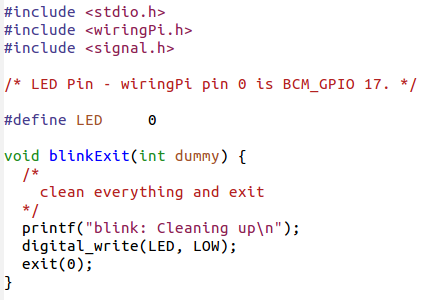
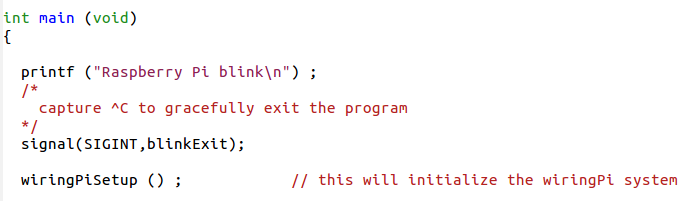
When we have a program like our blink program, then the only way to exit the endless loop is a ^C which will leave the LED in an unknown state. Is there a way to exit the program gracefully and to make sure the LED is always off once the program exits?Yes, there is!
Slide 29: Killing the program
When we kill the program with ^C, a signal (SIGINT) is sent to it which normally results in a brutal stop of the program. It is however possible to capture the signal and do some cleanup before the program finally exits.Slide 30: Signal handler
Slide 31: Catching signals
Comments


| I | Attachment | Action | Size | Date | Who | Comment |
|---|---|---|---|---|---|---|
 png |
blink.png | manage | 48 K | 16 Oct 2018 - 20:18 | IsaacArmahMensah | |
| png |
blinkMake.png | manage | 6 K | 16 Oct 2018 - 20:59 | IsaacArmahMensah | |
| png |
check.png | manage | 19 K | 18 Oct 2018 - 04:15 | IsaacArmahMensah | |
| png |
comarg.png | manage | 8 K | 18 Oct 2018 - 03:21 | IsaacArmahMensah | |
| png |
condition.png | manage | 13 K | 17 Oct 2018 - 20:58 | IsaacArmahMensah | |
| png |
endlessloop.png | manage | 5 K | 18 Oct 2018 - 03:21 | IsaacArmahMensah | |
| png |
gpio1.png | manage | 157 K | 16 Oct 2018 - 19:48 | IsaacArmahMensah | |
| png |
install.png | manage | 40 K | 18 Oct 2018 - 03:27 | IsaacArmahMensah | |
| png |
loop.png | manage | 12 K | 17 Oct 2018 - 20:58 | IsaacArmahMensah | |
| png |
resistor.png | manage | 7 K | 17 Oct 2018 - 04:18 | IsaacArmahMensah | |
| png |
rootuser.png | manage | 11 K | 18 Oct 2018 - 03:27 | IsaacArmahMensah | |
| png |
strstr.png | manage | 18 K | 18 Oct 2018 - 04:10 | IsaacArmahMensah | |
| png |
testarrange.png | manage | 32 K | 18 Oct 2018 - 04:15 | IsaacArmahMensah |