
A little test on what you have learned in the exercises on
Linux command line and basics of C programming
Linux commands:
-
Which Linux command do you use to list all files in a directory (folder)?
-
How do you see hidden files and how do you recognize them?
-
How do you see the file permissions?
-
How can you find out your current working directory?
-
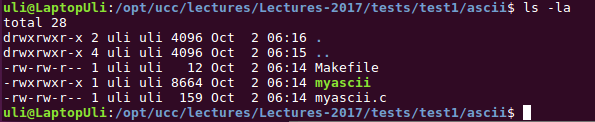
In the following screen dump I show the contents of one of my directories. You see two directories named \x93.\x94 and \x93..\x94 . What do these mean?
-
You downloaded the file \x93yesterday.txt\x94 to your $HOME/Downloads directory. How do you copy this file to your current working directory?
-
Which command do you use to see the content of yesterday.txt
-
Which command do you use to list all lines containing the string \x93yesterday\x94 in yesterday.txt?
C programming
- The ASCII equivalent of the character \x910\x92 is 0x30
What does the following program print?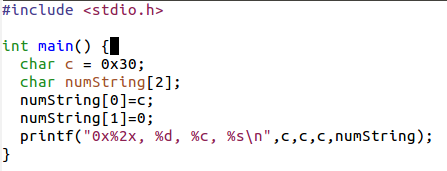
- You can write programs allowing the user to enter command line parameters. The following program \x93cl.c\x94 does this.
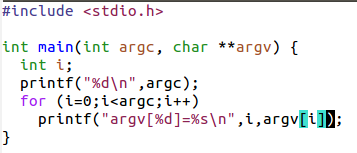
What will it print if the user types:
./cl ike uli 25
Comments


| I | Attachment | Action | Size | Date | Who | Comment |
|---|---|---|---|---|---|---|
 png |
cl.png | manage | 14 K | 02 Oct 2017 - 15:21 | UnknownUser | |
| png |
ls.png | manage | 17 K | 02 Oct 2017 - 15:21 | UnknownUser | |
| png |
myascii.png | manage | 14 K | 02 Oct 2017 - 15:21 | UnknownUser |






Topic revision: r1 - 02 Oct 2017, uli