
Solutions to the programming exercises
Hello World
When learning C almost everybody comes across a program called "Hello World". This is the most simple C program you can possibly write. It has the advantage though that once it works you know that your infrastructure: compiler, linker, C-library etc. are working properly. Here is the program: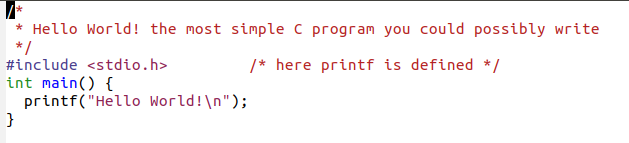 and this is what you see when you compile and run it

Exercise 2.3 Pointers
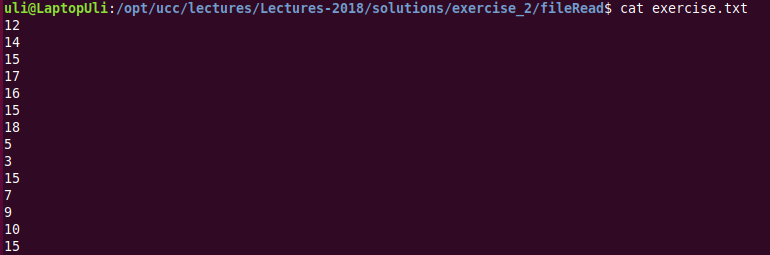
Frankly speaking, going from "Hello World" to a file reading program with pointers is a huge jump. It would be better to continue with exercise 2.4 first before trying to attack this one. An additional difficulty is that a priori we do not know the length of the file. Looking at the file exercise.txt with file and cat we see that it is an ASCII file with integer numbers (more precisely their ASCII representation)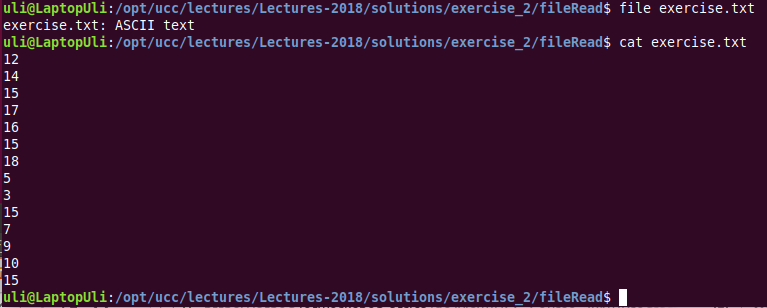 There are different ways to try and solve the problem:
- We can try to read the file line by line with the library call getline (check it out with man!) using a fixed size line buffer. This reads a character string which we can print out with printf using the "%s" string format. This solution does not necessarily use pointers.
- We can read the file in a single go into a statically allocated (on the stack) file buffer, which must be big enough to hold the full file. The fread library call returns the number of characters (not the number of integers!) and we can print the characters one by one.
- We can figure out the file size using fseek and then dynamically (on the heap) allocate exactly the amount of memory needed to contain the full file. Again characters are printed.
- We can read the file and convert the numbers from ASCII to binary and store the numbers in a fixed size array. Then the numbers are printed
- We can read the file and test how many numbers can be converted such that the integer array containing the numbers can also be dynamically allocated.
Exercise 2.4: A Calculator
The calculations are extremely simple and they are implemented each in its own individual C file, Here is the example for addition: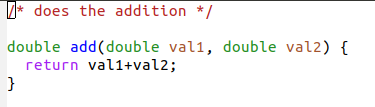 and here is the corresponding include file:
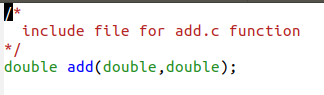 A little bit more complex is the reading of the operators and the operand. These are read as command line arguments and they are therefore strings and must be converted into binary representation before we can do any calculations with them:
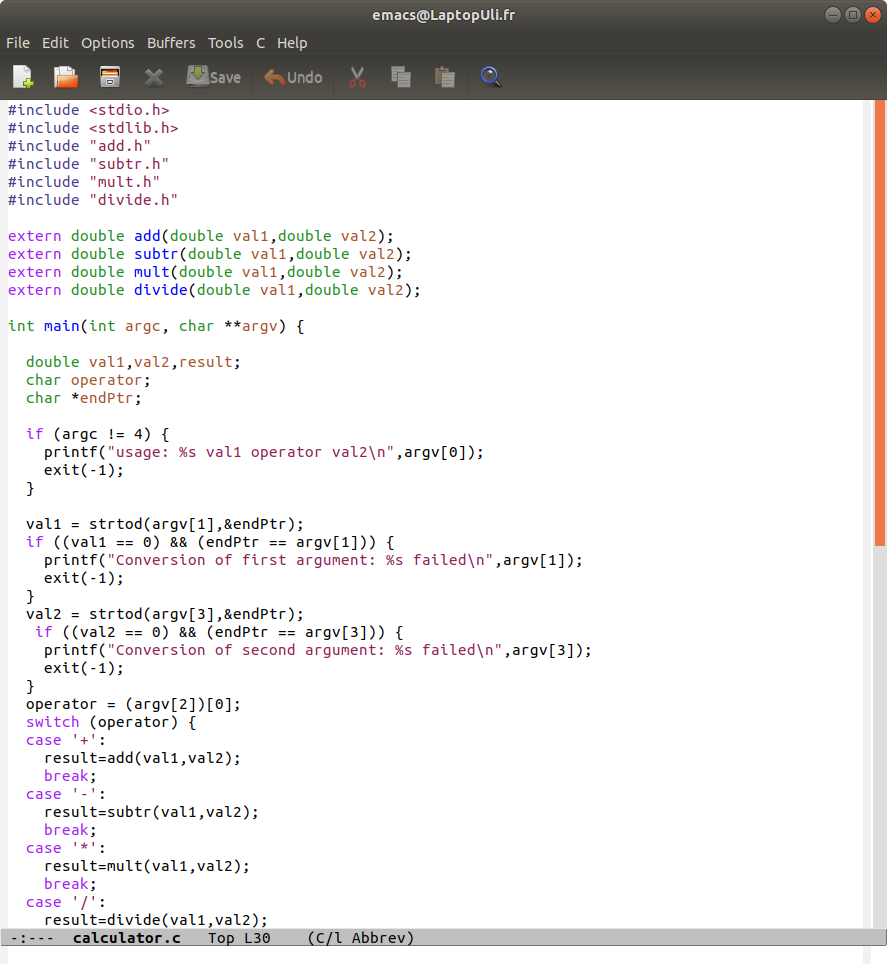 First we make sure that exactly 3 parameters are given (argc == 4, because it counts the executable name as the first parameter). Then we convert the operands from string (argv[1] and argv[3]) to double. The operator is the first character (character number 0) of the second argument: argv[2][0].
Now we can call the function implementing the operation and print the results. The full program is here:
https://iotworkshop.africa/pub/Embedded_Systems/Exercise2Solutions/calculator.tar,gz
Exercise 2.5 Conversion function
The conversion of the calculator to an octal or hex one is included in the solution for exercise 2.4 The conversion function is still a different story: The calculator uses ASCII strings for its input and output. If the conversion function is to be in relation with the calculator then the conversion must be from a text string containing a decimal number to a text string containing a hex or binary number). However: For certain applications (e.g. real time clock) BCD (Binary Coded Decimal) is used. In this coding a hex digit only has values up to 9. The number 28 would then not be converted into 0x1C but into 0x28. We could in this case convert a BCD coded number into a binary coded number. I presume that the first version is wanted for which this could be a solution: https://iotworkshop.africa/pub/Embedded_Systems/Exercise2Solutions/conv.tar.gzComments
I was waiting for the solutions but did not see anything come up. So... I started to write at least partial solutions← PreviousSolutions to exercise session 1OverviewSolutions to the exercisesNext →Solutions to exercise 3: Development tools


| I | Attachment | Action | Size | Date | Who | Comment |
|---|---|---|---|---|---|---|
 png |
add.png | manage | 7 K | 05 Oct 2018 - 14:18 | UliRaich | |
| png |
addIncl.png | manage | 5 K | 05 Oct 2018 - 14:22 | UliRaich | |
| png |
calc.png | manage | 139 K | 05 Oct 2018 - 14:18 | UliRaich | |
 gz |
calculator.tar.gz | manage | 1 K | 05 Oct 2018 - 14:12 | UliRaich | |
| gz |
conv.tar.gz | manage | 752 bytes | 19 Dec 2018 - 09:56 | UliRaich | |
| png |
ex2numbers.png | manage | 14 K | 05 Oct 2018 - 13:49 | UliRaich | |
| png |
exerciseFile.png | manage | 31 K | 05 Oct 2018 - 13:55 | UliRaich | |
| gz |
fileRead.tar.gz | manage | 45 K | 19 Dec 2018 - 09:53 | UliRaich | |
| png |
helloResult.png | manage | 9 K | 05 Oct 2018 - 13:33 | UliRaich | |
| png |
helloWorld.png | manage | 16 K | 05 Oct 2018 - 13:33 | UliRaich |













Topic revision: r4 - 19 Dec 2018, UliRaich