
Solutions to exercise 3: Development tools
Exercise 3.1: A Makefile for the "Hello World!" program
For the simplest possible C program let's write the simplest possible Makefile: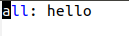 Give it a try to verify that it actually works! Of course we can improve this e.g. with a clean target etc.
If we want to generate assembly code as described in exercise 3.1 we have to modify the Makefile:
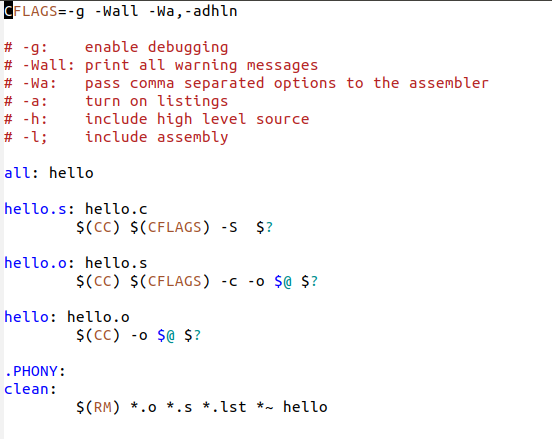 This will first generate an assembly language file named hello.s which is assembled to the hello.o object file in the second step (target hello.o). An assembly language listing (hello.lst) is created. The CFLAGS passed to the assembler
(-Wa,-adhln) will instruct it to generate a listing in which the original C code is mixed with the assembly language. Here an extract:
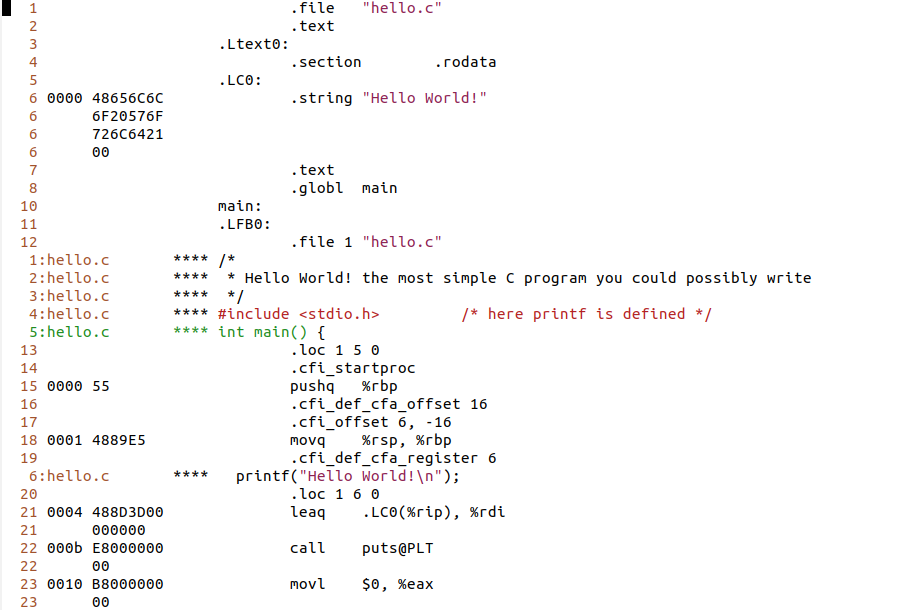 You can also see the final binary code on the left.
The Makefile is attached to this page:
https://iotworkshop.africa/pub/Embedded_Systems/Exercise3Solutions/Makefile
Exercise 3.3:
Program files and Makefile
We separate out the aveg function into a new file and add an include file with the function prototype: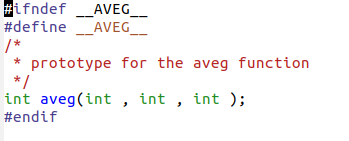 This file is included into exercise3.c. The #ifndef is there to make sure that the file is never included more than once.
Here is the Makefile:
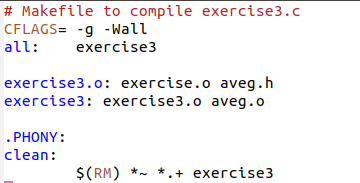 Two remarks to this:
- As you can see, only the dependencies are described: exercise3.o depends on exercise3.c and aveg.h. The fact that the system must use the C compiler to create exercise.o from exercise.c uses builtin rules.
- exercise3.o depends not only on its source file but also on the aveg.h include file. Try what happens it you modify / touch aveg.h (use the touch command) and run make again.
Debugging with gdb
Since we use the -g flag in CFLAGS the symbol table is preserved and we can use the debugger in order to see how the program works. Here is a screen dump of a gdb session on the exercise3 executable: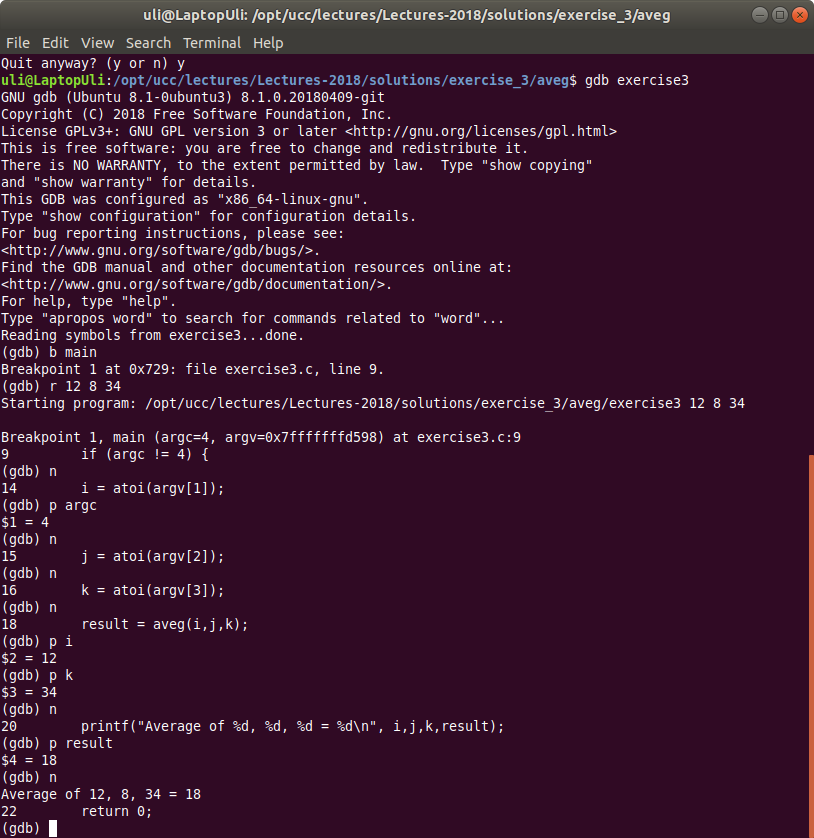 The full source code is given in
https://iotworkshop.africa/pub/Embedded_Systems/Exercise3Solutions/aveg.tar,gz
Debugging with printfs
Here I give you 2 examples, both using a function to set/reset debugging and a method to conditionally print debugging information. Both use a function setDebug(bool) to switch debugging on and off. The function bool getDebug(void) allows you to find out if debug messages are switched on or off. In the first case we use this function to decide if we must print or not using an if statement: This is debug.c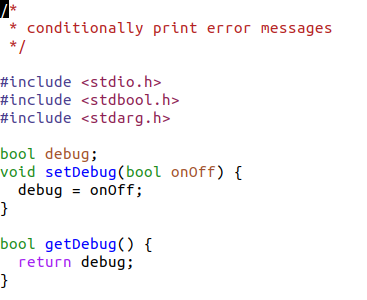 and this the conditional printing in exercise3.c:
 The second example is a bit more elegant but also more complex. Here the decision if we need to print or not is taken within the debugPrintf function. The tricky bit is that we do not know the number of parameters that will be passed into this function and we must create a variable size parameter list that will be passed into vprintf (instead of printf).
exercise3.c can then use this function, printing only if the variable debug has been set to true.
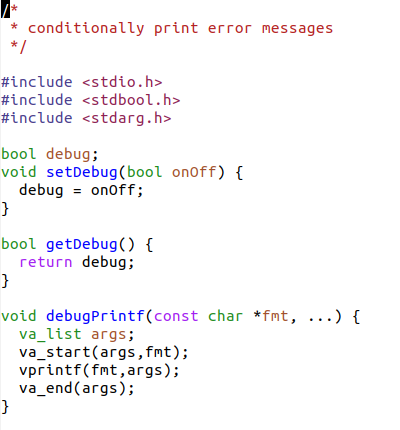 The full source code is again attached:
https://iotworkshop.africa/pub/Embedded_Systems/Exercise3Solutions/aveg2.tar.gz
and
https://iotworkshop.africa/pub/Embedded_Systems/Exercise3Solutions/aveg3.tar.gz
Comments
← PreviousSolutions to the programming exercisesOverviewSolutions to the exercisesNext →Solutions to exercise 4: The Raspberry Pi


| I | Attachment | Action | Size | Date | Who | Comment |
|---|---|---|---|---|---|---|
 EXT |
Makefile | manage | 424 bytes | 09 Oct 2018 - 13:28 | UliRaich | |
| simple |
Makefile.simple | manage | 11 bytes | 09 Oct 2018 - 13:19 | UliRaich | |
 png |
asmList.png | manage | 80 K | 09 Oct 2018 - 13:19 | UliRaich | |
| gz |
aveg.tar.gz | manage | 3 K | 08 Oct 2018 - 14:32 | UliRaich | |
| gz |
aveg2.tar.gz | manage | 3 K | 08 Oct 2018 - 14:32 | UliRaich | |
| gz |
aveg3.tar.gz | manage | 8 K | 08 Oct 2018 - 14:32 | UliRaich | |
| png |
debugCode.png | manage | 20 K | 08 Oct 2018 - 14:55 | UliRaich | |
| png |
debugPrintf.png | manage | 32 K | 08 Oct 2018 - 14:55 | UliRaich | |
| png |
gdbLog.png | manage | 135 K | 08 Oct 2018 - 14:32 | UliRaich | |
| png |
helloMakefile.png | manage | 1 K | 09 Oct 2018 - 13:17 | UliRaich | |
| png |
include.png | manage | 10 K | 08 Oct 2018 - 14:36 | UliRaich | |
| png |
makeAsm.png | manage | 39 K | 09 Oct 2018 - 13:17 | UliRaich | |
| png |
makefile.png | manage | 17 K | 08 Oct 2018 - 14:36 | UliRaich | |
| png |
setDebug.png | manage | 8 K | 08 Oct 2018 - 14:55 | UliRaich |


















Topic revision: r3 - 09 Oct 2018, UliRaich