
Introduction to C programming
Lecture 3
CSC321: Embedded Systems
First Semester 2018/2019
Slide 1: Programming Languages
-
A programming language is a vocabulary and set of grammatical rules for instructing a computer or computing device to perform specific tasks.
-
Each programming language has a unique set of keywords (words that it understands) and a special syntax for organizing program instructions.
-
To make a language a programming language it needs to implement:
-
Assignments
-
Conditional statements
-
loops
-
Slide 2: C libraries
-
C uses a large number of code libraries
-
You can create your own C libraries.
-
These libraries may use special data types, which are defined in include files
-
https://www-s.acm.illinois.edu/webmonkeys/book/c_guide/
-
-
Before using the library functions, you have to #include it.
#include <stdio.h>
or
#include \x93myOwnIncludeFile.h\x94
Slide 3: The C Program Structure
-
A C program basically consists of the following parts −
-
Preprocessor Commands
-
Functions
-
Variables
-
Statements & Expressions
-
Comments
-
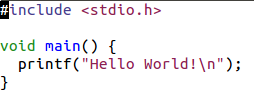
Slide 4: The C Program Structure
-
#include <stdio.h> is a preprocessor command, it tells a C compiler to include stdio.h file before going to actual compilation.
-
int main() is the main function where the program execution begins.
-
/*...*/ is a comment and will be ignored by the compiler.
-
printf(...) is \x93formatted print\x94 used in the HelloWorld program to print the string "Hello, World!".
-
return 0 ; terminates the main() function and returns the value 0.
-
a semicolon (;) is a statement terminator. It indicates the end of one logical entity.
-
gcc compiler is used in compiling C programs
-
gcc -o hello hello.c /* -o(output), hello(output file), hello.c(program)*/
-
./hello/*run/execute the output*/
-
Slide 5: Data Types
-
Data types in C refer to an extensive system used for declaring variables or functions of different types.
-
Basic Types:-They are arithmetic types and are further classified into:
-
integer types
-
floating-point types
-
-
Enumerated types :- They are again arithmetic types and they are used to define variables that can only assign certain discrete integer values throughout the program
-
The type void :- The type specifier void indicates that no value is available.
-
Derived types :- They include Pointer types, Array types, Structure types, Union types and Function types.
Slide 6: Operators
-
An operator is a symbol that tells the compiler to perform specific mathematical or logical functions. C language is rich in built-in operators and provides the following types of operators −
-
Arithmetic Operators
-
Relational Operators
-
Logical Operators
-
Bitwise Operators
-
Assignment Operators
-
Misc Operators
-
Slide 7: Arithmetic Operators
Let A = 15 and B = 30
| Operator | Description | Example |
|---|---|---|
| + | Adds two operands. | A + B = 30 |
| − | Subtracts second operand from the first. | A − B = -10 |
| * | Multiplies both operands. | A * B = 200 |
| / | Divides numerator by denumerator. | B / A = 2 |
| % | Modulus Operator and remainder of after an integer division. | B % A = 0 |
| ++ | Increment operator increases the integer value by one. | A++ = 11 |
| -- | Decrement operator decreases the integer value by one. | A-- = 9 |
Slide 8: Relational Operators
Let A = 15 and B = 30| Operator | Description | Example |
|---|---|---|
= |
Checks if the values of two operands are equal or not. If yes, then the condition becomes true. | (A = B) is not true. |
| != | Checks if the values of two operands are equal or not. If the values are not equal, then the condition becomes true. | (A != B) is true. |
| > | Checks if the value of left operand is greater than the value of right operand. If yes, then the condition becomes true. | (A > B) is not true. |
| < | Checks if the value of left operand is less than the value of right operand. If yes, then the condition becomes true. | (A < B) is true. |
| >= | Checks if the value of left operand is greater than or equal to the value of right operand. If yes, then the condition becomes true. | (A >= B) is not true. |
| <= | Checks if the value of left operand is less than or equal to the value of right operand. If yes, then the condition becomes true. | (A <= B) is true. |
Slide 9: Logical Operators
Let A = 1 and B = 0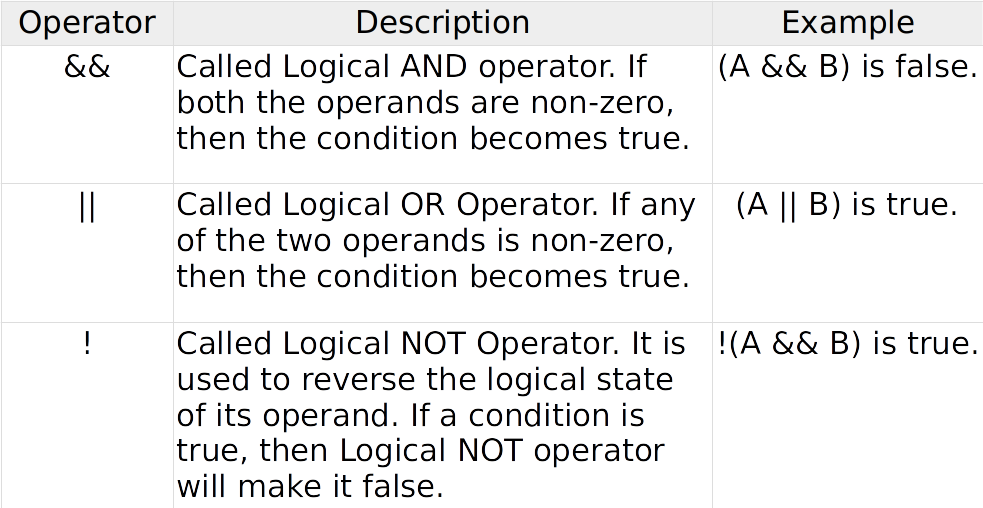
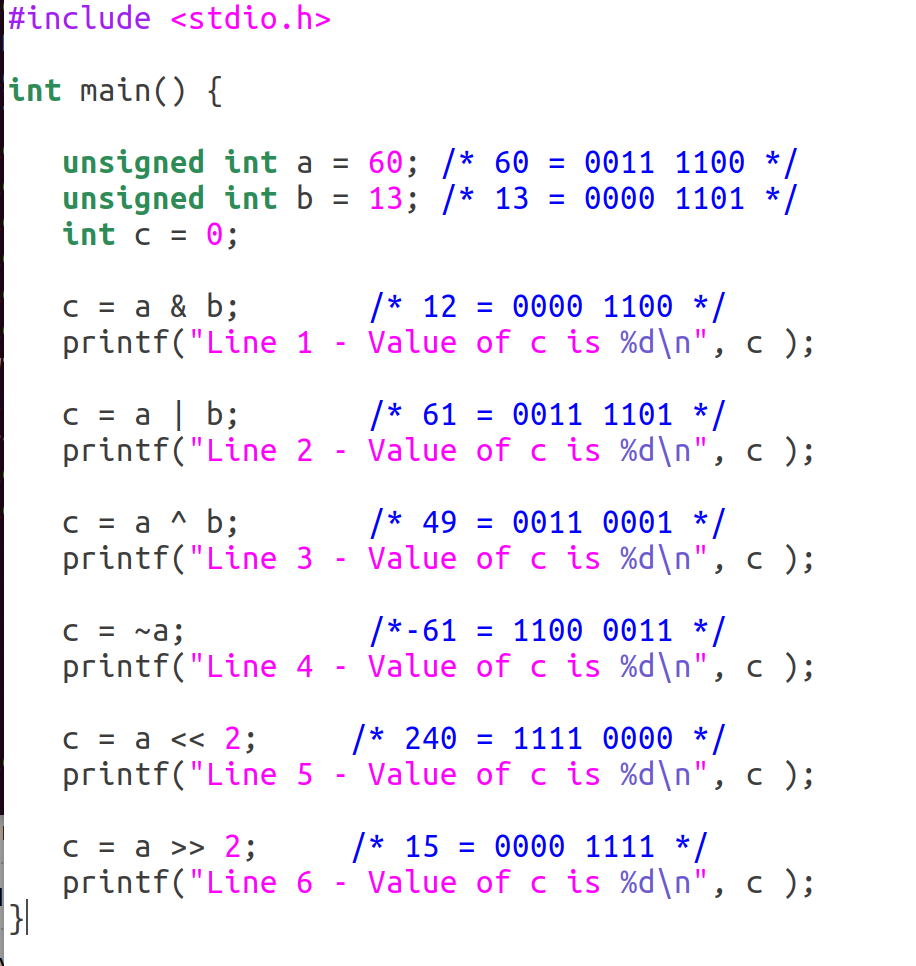
Slide 10: Bitwise Operators
Let A = 60 and B = 13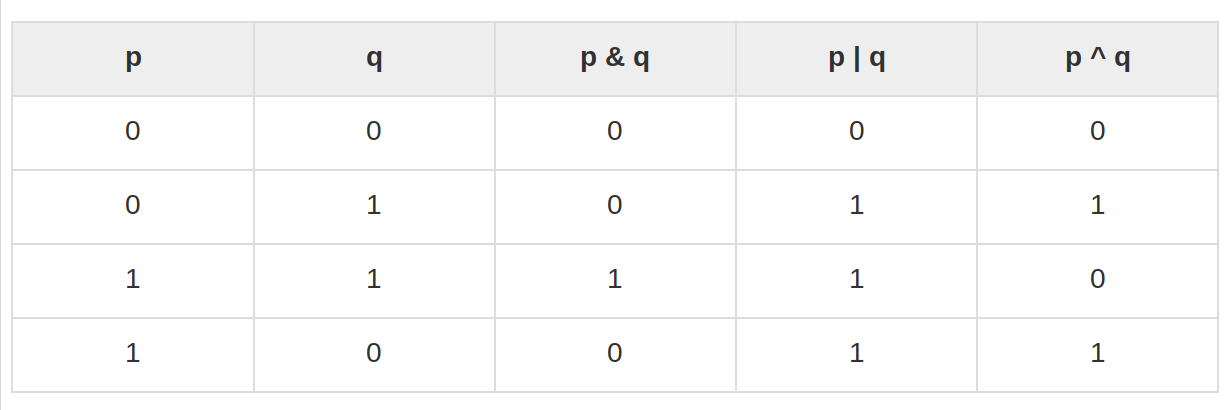
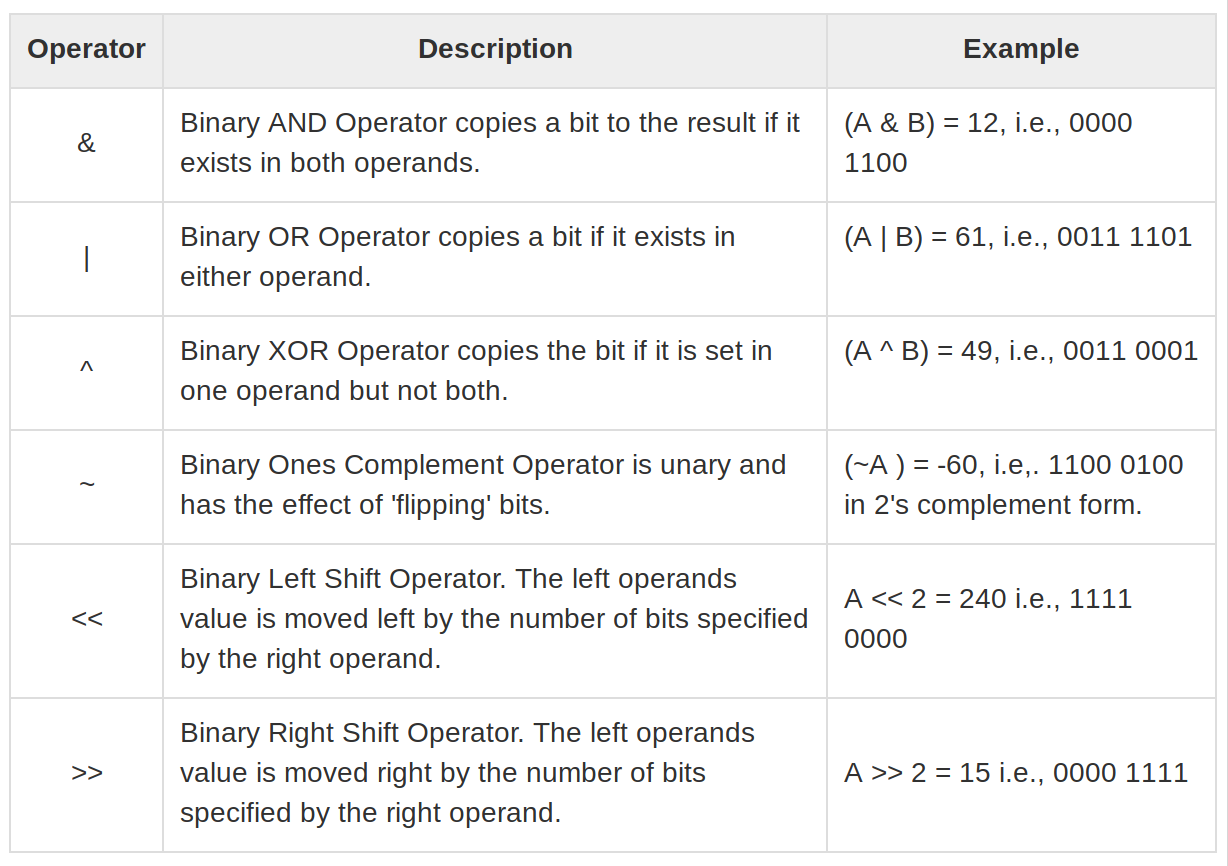
Slide 11: Assignment Operators
| Operator | Description | Example |
|---|---|---|
| = | Simple assignment operator. Assigns values from right side operands to left side operand | C = A + B will assign the value of A + B to C |
| += | Add AND assignment operator. It adds the right operand to the left operand and assign the result to the left operand. | C += A is equivalent to C = C + A |
| -= | Subtract AND assignment operator. It subtracts the right operand from the left operand and assigns the result to the left operand. | C -= A is equivalent to C = C - A |
| *= | Multiply AND assignment operator. It multiplies the right operand with the left operand and assigns the result to the left operand. | C *= A is equivalent to C = C * A |
| /= | Divide AND assignment operator. It divides the left operand with the right operand and assigns the result to the left operand. | C /= A is equivalent to C = C / A |
| %= | Modulus AND assignment operator. It takes modulus using two operands and assigns the result to the left operand. | C %= A is equivalent to C = C % A |
| <<= | Left shift AND assignment operator. | C <<= 2 is same as C = C << 2 |
| >>= | Right shift AND assignment operator. | C >>= 2 is same as C = C >> 2 |
| &= | Bitwise AND assignment operator. | C &= 2 is same as C = C & 2 |
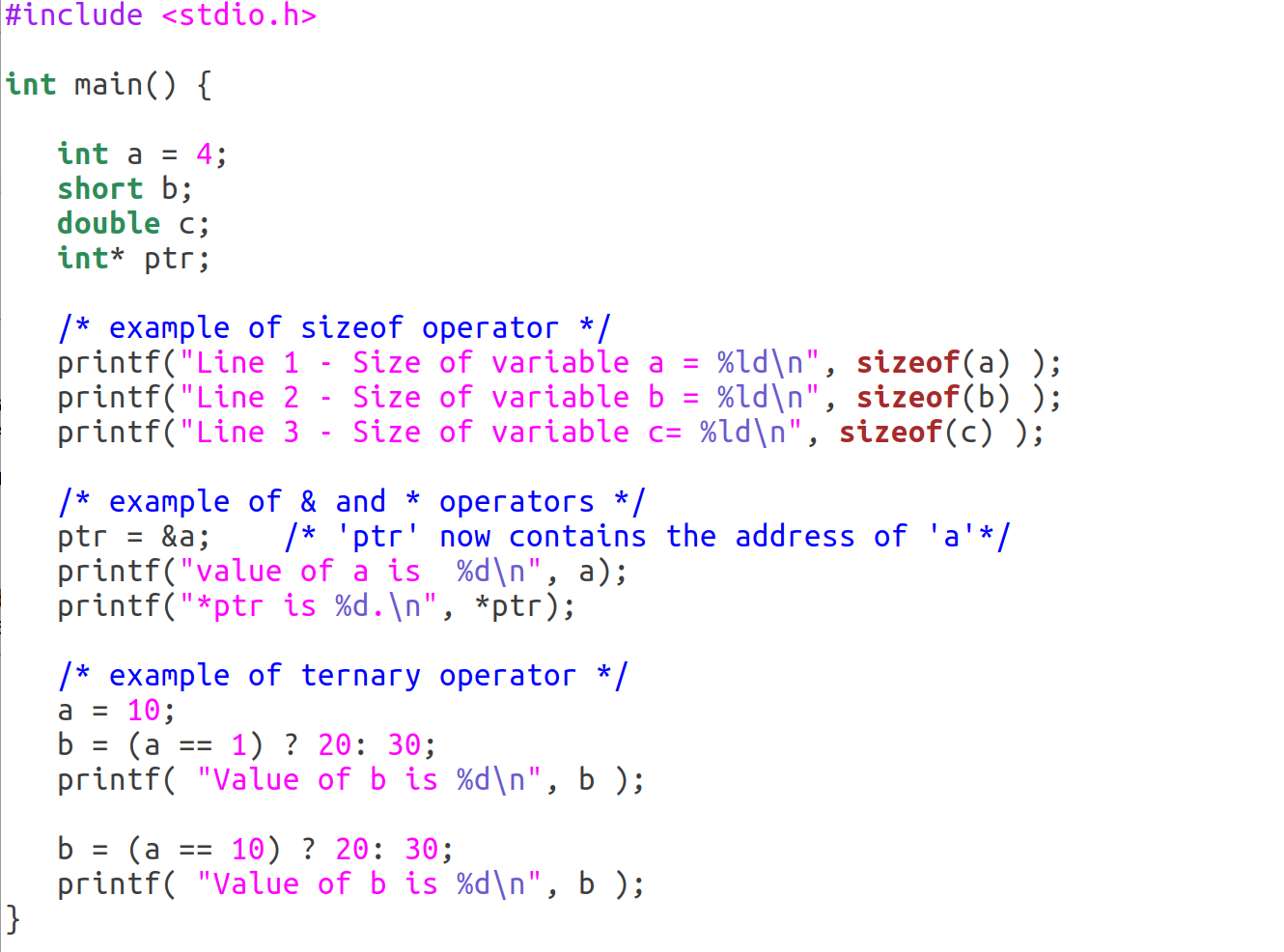
Slide 12: Miscellaneous Operators
| Operator | Description | Example |
|---|---|---|
| sizeof() | Returns the amount of memory allocated to data type. | sizeof(a), where a is integer, will return 4. |
| & | Returns the address of a variable. | &a; returns the actual address of the variable. |
| * | Pointer to a variable. | *a; |
| ? : | Conditional Expression. | If Condition is true ? then value X : otherwise value Y |
Slide 13: Type Casting
-
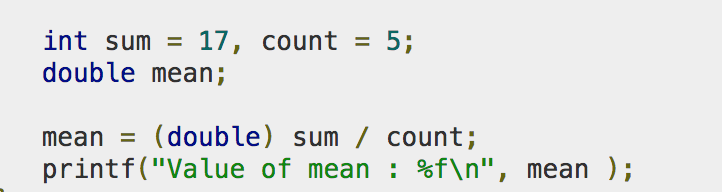
Type casting is a way to convert a variable from one data type to another data type
-
Why do we get this strange result for the division? and how can we correct this?
-
Yes, the reason is that div has got the wrong (namely integer) type
-
To correct we must first convert a and b to doubles (or floats) before doing the calculation and div must be a double as well.
Slide 14: Print Formatted Output
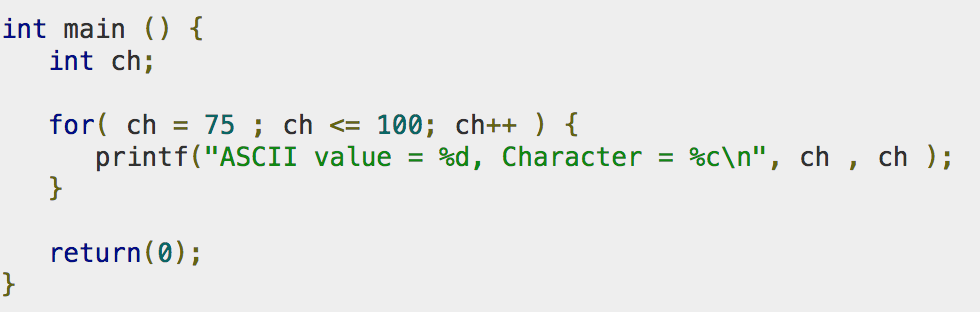
The function printf sends formatted output to stdout.
format string \x93%d\x94 tells the system to output the result as a decimal.
There are many additional number formats, look up the man printf
Instead of printing on the screen you can also convert the number to a string using sprintf or print to a file using fprintf(the file must be opened first, see later)
The equivalent call for input also exists and is called scanf .
Slide 15: Conditional Statements
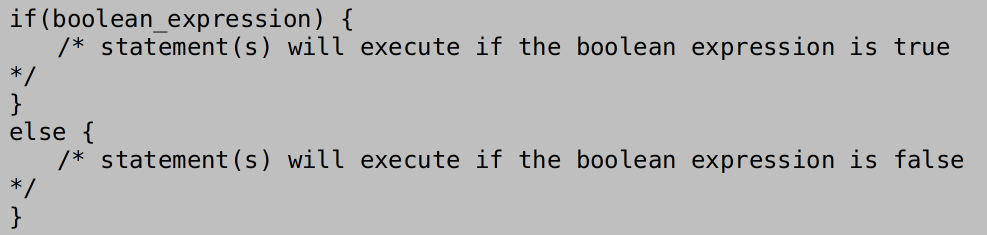
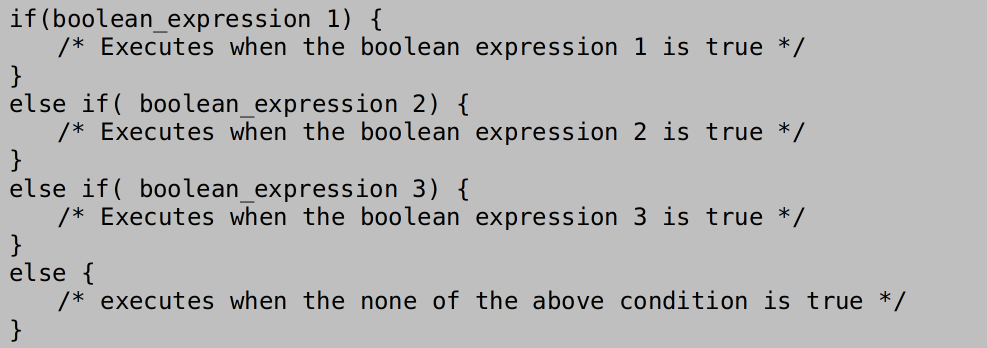
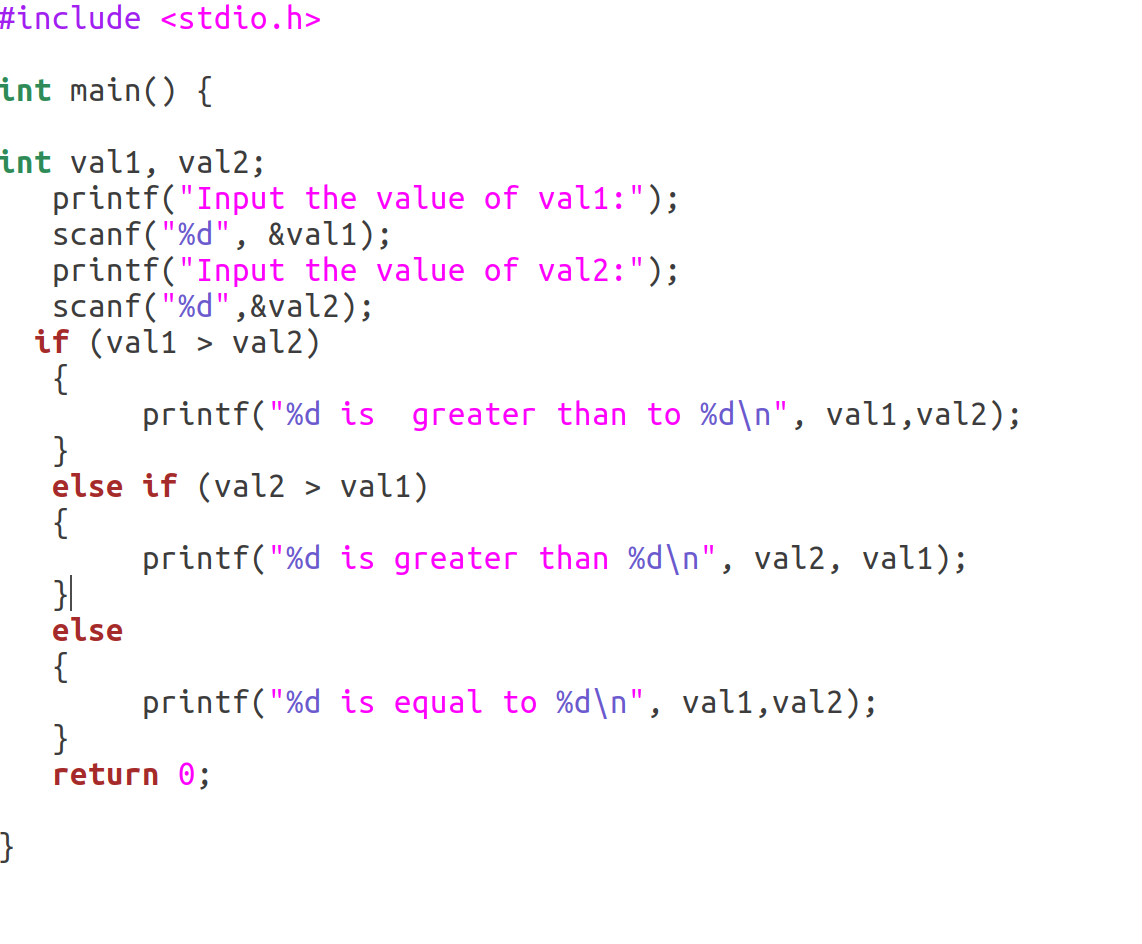
An if statement consists of a boolean expression followed by one or more statements.

Syntax for if...else statement
Syntax for if...elseif...else statement
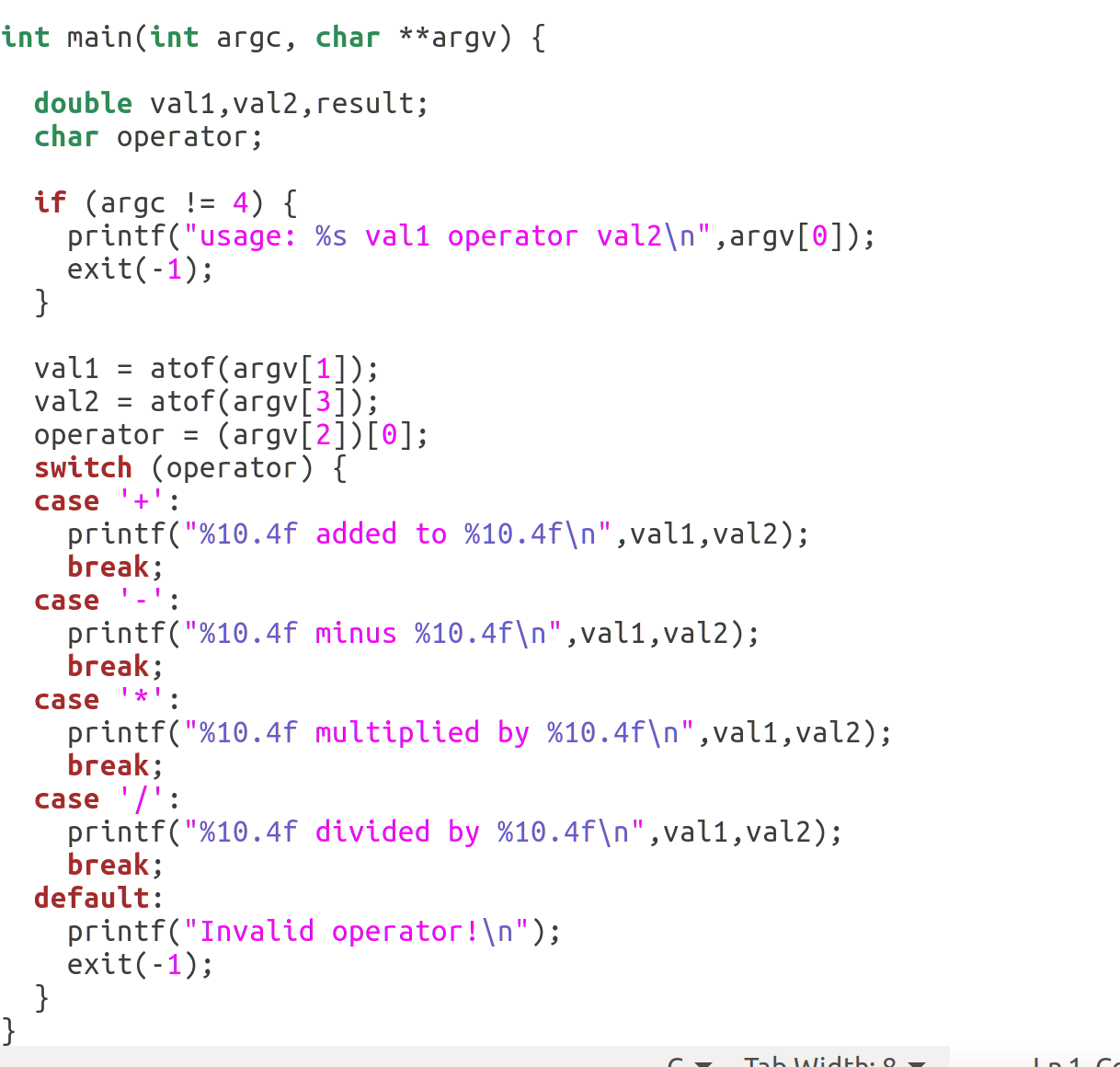
Slide 16: Switch
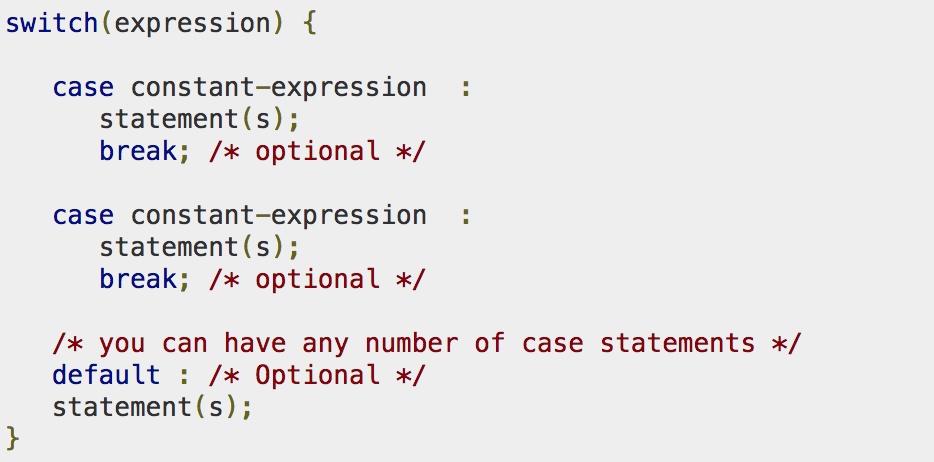
A switch statement allows a variable to be tested for equality against a list of values.
Each value is called a case, and the variable being switched on is checked for each switch case.
Slide 17: Switch Example
Slide 18: While Loop
A while loop repeatedly executes a target statement as long as a given condition is true.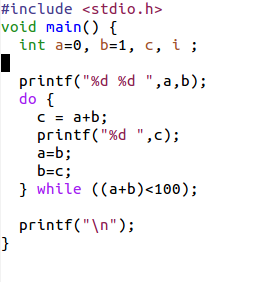
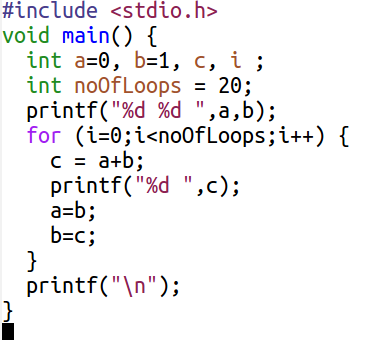
Slide 19: For loop
A for loop is a repetition control structure that allows you to efficiently write a loop that needs to execute a specific number of times.
Slide 20: Pointers
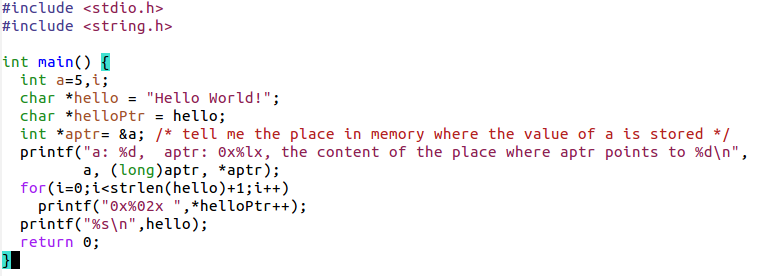
A pointer is a variable whose value is the address of another variable, i.e., direct address of the memory location.
We can define variables which do not contain the value but the address of where the value is stored in memory:
type *var-name;*
char a=5; is the value
char *myText=\x94Hello World!\x94;
myText points to the place in memory where Hello World is stored.

Slide 21: Pointer Example
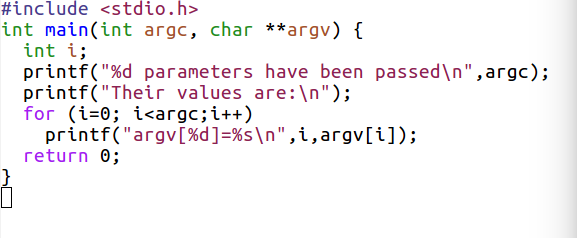
Slide 22: Command Line Argument
It is possible to pass some values from the command line to your C programs when they are executed.
These values are called command line arguments
They are are important for controlling programs from outside instead of hard coding those values inside the code.
The command line arguments are handled using main() function arguments where
int main(int argc, char * argv) or
int main(int argc, char *argv[ ]);
int argc is the number of arguments passed
char **argv[] is a pointer which points to a list of null terminated C strings passed to the program.
Slide 23: Command Line Example
Slide 24: Composite variables
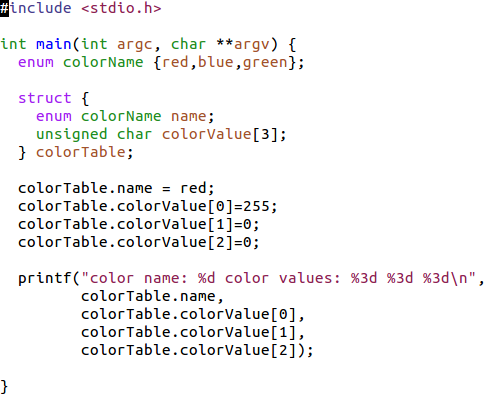
We can have a series of values of the same type in an array:int myArray[10]; the size of the array is fixed! An array is in reality a pointer to a series of values of the same type. Or we can define structures where values of different types can be combined In addition we have enumerations with a certain fixed range of values.
Slide 25: Composite data type example
Slide 26: Functions
A function is a group of statements that together perform a task.
Every C program has at least one function, which is main(), and all the most trivial programs can define additional functions.

Bigger problems must be broken down into smaller, manageable pieces using functions
These functions may go into the same file as main but also into separate files.
Then they are compiled separately and linked to the main routine to form an executable program.
File I/O
The standard input and output devices handled to create, open, close text files for their data storage.
A file represents a sequence of bytes, regardless of it being a text file or a binary file.
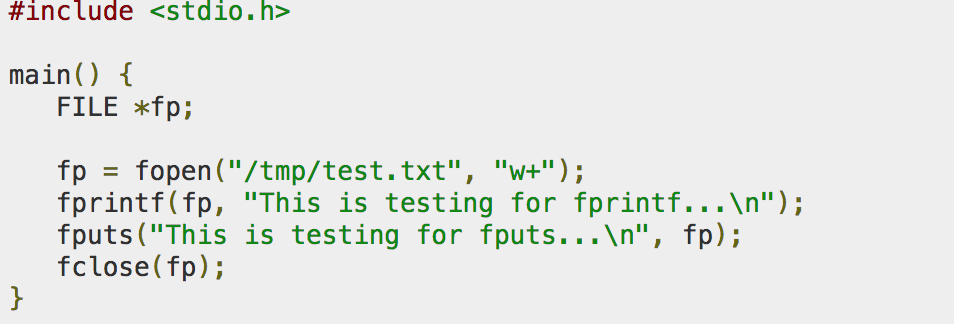
For C File I/O you need to use a FILE pointer, which will let the program keep track of the file being accessed.
FILE *fp;
Slide 27: fopen
To open/create a file you need to use the fopen() function, which returns a FILE pointer. This call will initialize an object of the type FILE, which contains all the information necessary to control the stream.
Once you've opened a file, you can use the FILE pointer to let the compiler perform input and output functions on the file.
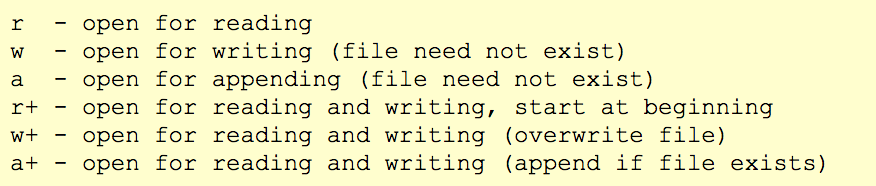
FILE *fopen(const char *filename, const char *mode);

fopen modes
fclose
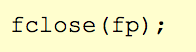
When you're done working with a file, you should close it using the function fclose().
fclose returns zero if the file is closed successfully.
int fclose(FILE *a_file);
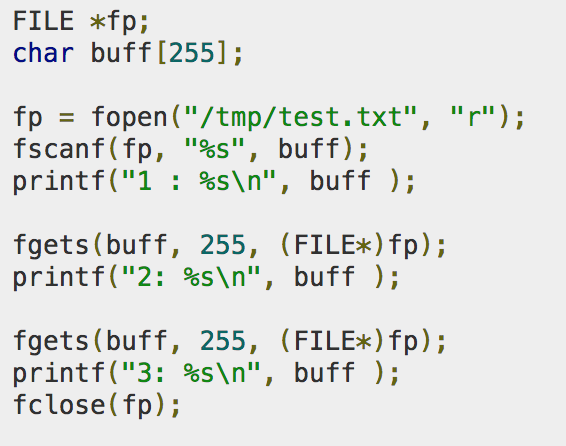
Slide 28: Reading & Writing
The function fputc() writes the character value of the argument c to the output stream referenced by fp
The fgetc() function reads a character from the input file referenced by fp.
Slide 29: Include files
How does the main program know the name of the function and its parameters? Define these in an include file to be added to the calling program: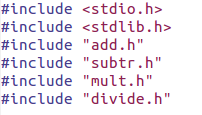 and the call itself:
result = add( 5.2, 4.8);
Slide 30: Contents of the include file
This is how the add.h include file could look like: /*include file for add.c function
*/ double add(double,double);
Slide 31: Libraries
A big number of libraries are available for use with C and you can write you own libraries to extend the set. There are two types of libraries: static libraries and dynamic ones. The static libraries are named lib name of the library .a Example libm.a is a library that contains a large set of mathematical functions Its dynamic brother is called libm.so When linking statically the library is added to the executable making it substantially bigger but independent of library versions The dynamic library is loaded once into memory and can be used by several executables. The executable is therefore much smaller but there is a risk it will not work if it was linked to a wrong library version, the library is not available or cannot be found.Slide 32: Linking libraries
Let\x92s say your program sine.c uses the sine function. The you must link it to libm In the static case: gcc -static -o sine sine.o -lm In the dynamic case you skip the -static option gcc -o sine sine.c -lmComments


| I | Attachment | Action | Size | Date | Who | Comment |
|---|---|---|---|---|---|---|
 odp |
Lecture_3.odp | manage | 882 K | 20 Sep 2018 - 11:07 | IsaacArmahMensah | |
 pptx |
Lecture_3.pptx | manage | 599 K | 18 Sep 2018 - 06:29 | IsaacArmahMensah | |
 png |
bitwise.png | manage | 128 K | 20 Sep 2018 - 07:45 | IsaacArmahMensah | |
| png |
condition.png | manage | 101 K | 20 Sep 2018 - 09:19 | IsaacArmahMensah | |
| png |
misc.png | manage | 147 K | 20 Sep 2018 - 09:19 | IsaacArmahMensah | |
| png |
switch.png | manage | 170 K | 20 Sep 2018 - 10:13 | IsaacArmahMensah |